Verdure: A Botanical Color Font for Modern Design
In the quest for truly distinctive visual assets, designers often seek elements that blend artistry with function. Enter Verdure, a stunning color font that transforms ordinary typography into a vibrant, botanical celebration. This isn't just another typeface; it's a creative resource designed to infuse projects with organic elegance and a fresh, modern aesthetic.
Understanding the Power of a Color Font
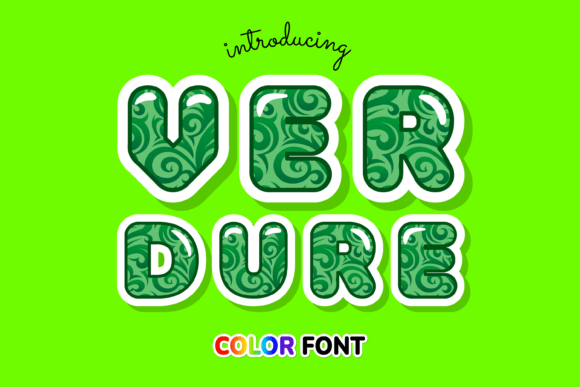
Verdure is an OpenType-SVG color font, a technology that allows each glyph to contain multiple colors, gradients, and intricate details—in this case, beautifully rendered botanical elements. Unlike standard fonts limited to a single color, Verdure’s letters are adorned with leaves, vines, and floral motifs, offering immediate visual impact. This makes it a powerful tool for graphic design where capturing attention is paramount.
Practical Applications for Creative Projects
The versatility of Verdure extends across numerous design disciplines. Its unique character can elevate a wide range of creative work, providing a signature touch that stands out in a crowded visual landscape.
- Branding & Logo Design: Create unforgettable brand marks for companies in wellness, cosmetics, artisanal food, or lifestyle sectors. Verdure helps build a brand identity that feels authentic, connected, and premium.
- Marketing & Social Media Graphics: Stop the scroll. Use Verdure for headlines on posters, digital ads, and social media posts to instantly communicate themes of nature, growth, and vitality, boosting user engagement.
- Packaging & Product Design: Make products leap off the shelf. The font is ideal for labels, tags, and packaging design, especially for organic, eco-friendly, or botanical-themed goods.
- Editorial & Web Design: Incorporate Verdure into magazine covers, book titles, or website hero sections to establish a strong visual hierarchy and a captivating mood. It's excellent for creating striking UI design elements like call-to-action buttons or section headers.
- Digital Products & Merchandise: Design beautiful printable art, greeting cards, or merchandise like tote bags and apparel with a handcrafted, artistic feel.
Tips for Effective Use in Your Design Workflow
Integrating a specialized font like Verdure requires thoughtful application to ensure it enhances rather than overwhelms your project. Here are key considerations for maintaining a professional presentation:
- Prioritize Readability: Verdure’s decorative nature makes it best suited for headlines, logos, and short display text. For body copy, pair it with a clean, complementary sans-serif or serif font to ensure clarity and maintain a good visual hierarchy.
- Consider Scalability: As a detailed color font, test Verdure at various sizes. It shines at larger scales where its botanical details are visible. For smaller applications, ensure the design remains legible.
- Match the Audience and Goal: The organic, lush style of Verdure has specific connotations. It’s perfect for audiences and brand identities aligned with nature, sustainability, beauty, or wellness. Ensure it aligns with your project’s design goals and audience expectations.
- Check Compatibility: Remember, Verdure is an OpenType-SVG font. It works seamlessly in modern design software like Adobe Photoshop, Illustrator, and Silhouette. However, it is not compatible with Cricut. Always verify software support for color fonts within your design workflow.
Ultimately, the most effective designs are those built with intention and high-quality assets. By choosing a resource like Verdure, you’re not just selecting a typeface; you’re investing in a visual language that can communicate complex ideas—natural beauty, artisanal quality, and organic growth—instantly. Thoughtful typography and a cohesive color palette are the cornerstones of professional visual design, enabling you to create work that resonates deeply and achieves its communicative purpose with elegance and impact.